

Overview
You’re not limited to a single order form. Knead lets you run several — an everyday menu, a holiday pre-order form, a wedding inquiry form, a wholesale form — each with its own fields and its own link. They all live together on the Order Forms page, and it’s available on every plan.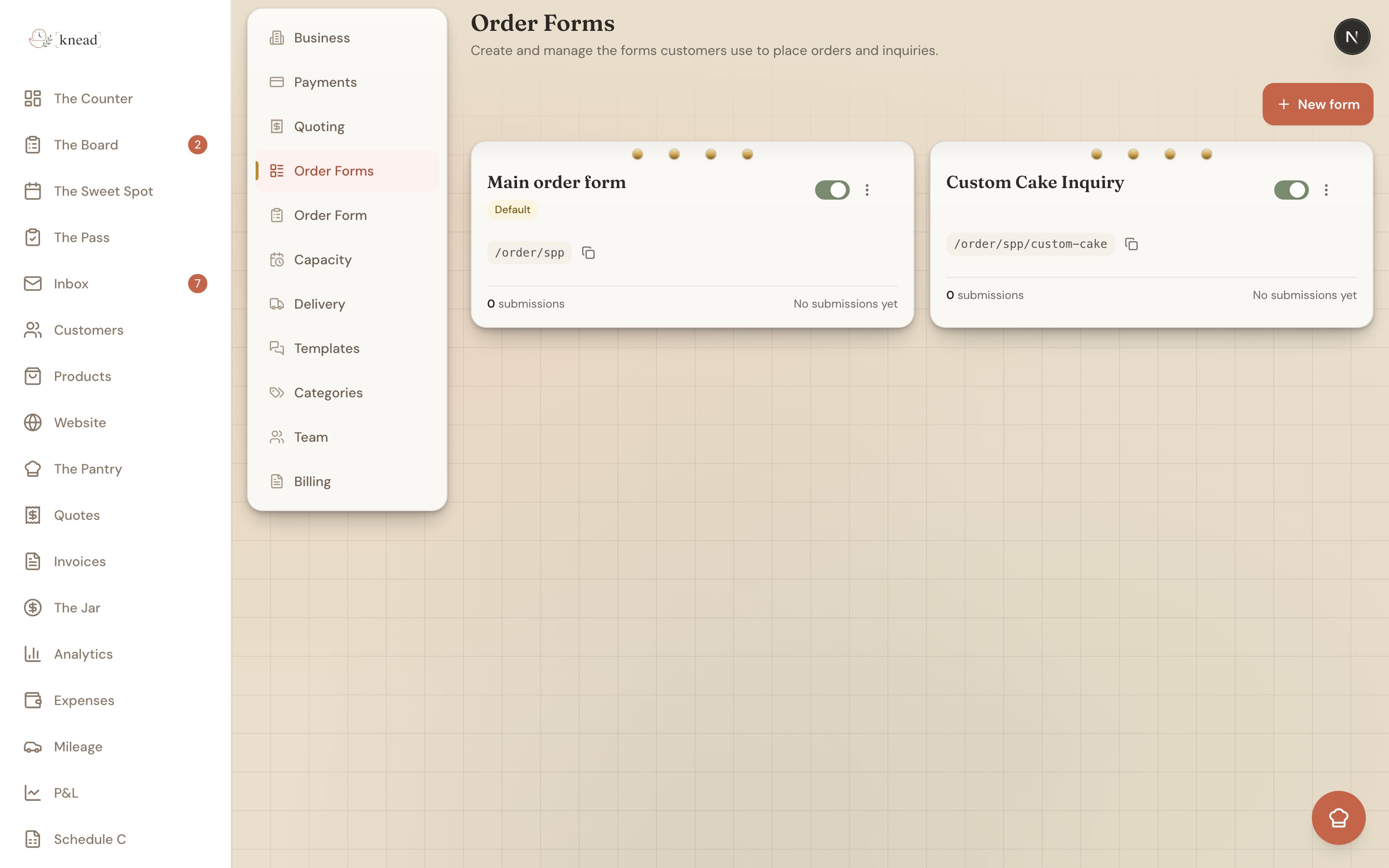
Where Your Forms Live
Tap Settings, then Order Forms (/settings/order-forms). Your forms appear as a card grid — one card per form.
Good to know: Order Forms (plural) is where you build and manage your forms. It’s a different page from Order Form (singular), which handles your public form and availability settings.
Reading a Form Card
Each card gives you the essentials at a glance:- Form name — what you’ve called it.
- A Default or Inactive badge — the default form is the one that answers your main link; an inactive badge means the form is paused.
- The public link —
/order/{slug}for the default form, or/order/{slug}/{form-slug}for the others. - Submission count and the last-submitted time, so you can see which forms are pulling their weight.
- An active / paused switch to open or close the form to customers without leaving the page.
- A menu with the actions below.
The Card Menu
Open a card’s menu for these actions:- Open — jump into the builder for that form.
- Copy link — grab the form’s public URL to share.
- Duplicate — make a copy to use as a starting point for a new form.
- Delete — remove a form. You can’t delete the default form, only extra ones.
Creating a New Form
Tap New form. Knead creates the form and drops you straight into the builder so you can start adding fields. Give it a name on the Settings tab, build it out on the Build tab, and flip it live when you’re ready.When to Run More Than One Form
A few ways bakers use multiple forms:- Seasonal menus — a Valentine’s or holiday form with just those items, live only during the window.
- Wedding and custom inquiries — a form that asks about guest count, event date, and design ideas instead of listing products.
- Wholesale or corporate — a form with different products, minimums, or pricing for business customers.
- Events and markets — a pre-order form for a specific pop-up or farmers market date.
The Default Form and Its Link
One form is always your default. It answers your main order link,kneadapp.co/order/{slug}, and it can’t be deleted. Every other form gets a link with an extra piece: kneadapp.co/order/{slug}/{form-slug}.
Good to know: Your default form — the Main order form — starts empty. While it’s empty, your main link keeps showing the classic all-products order form. As soon as you add a field to it in the builder, it switches to your custom build.
Related Articles
- Building a Custom Order Form
- Sharing Your Order Link
- How The Board Works
- Customizing Your Public URL
- Reviewing and Accepting Enquiries
Still need help? Contact us