

Overview
Your production hours tell Knead how much you can realistically bake and when. They are the foundation of your capacity calculations — without them, The Sweet Spot can’t show you how full each day is or warn you before you overbook. You set them in one place: Settings → Capacity.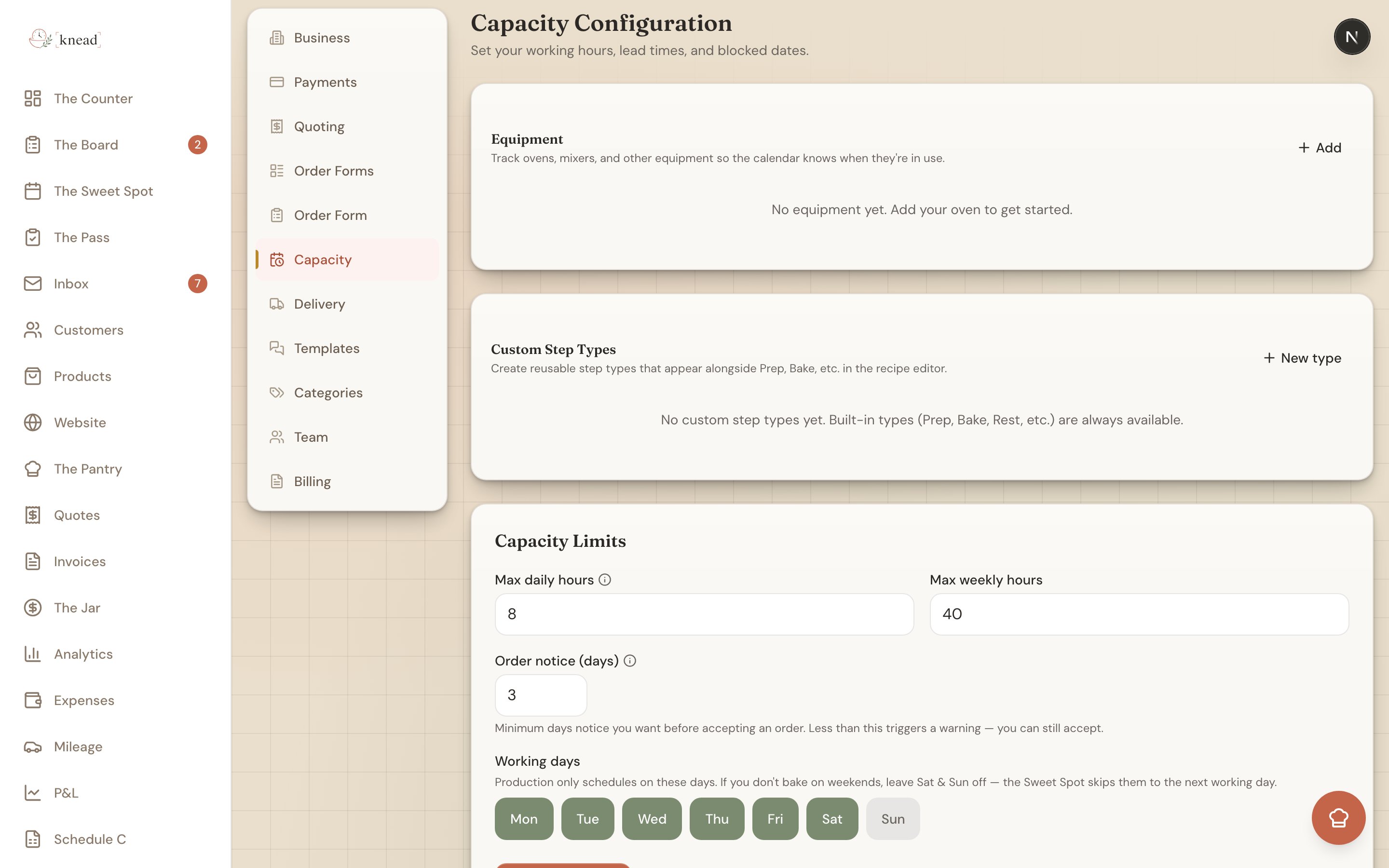
Where to Set Your Hours
- Tap your business name in the top-left corner to open Settings.
- Tap Capacity (“Hours, lead times & limits”).
Max Daily Hours
Max daily hours is a single number: the most hours you’re willing to spend baking in one day. If you can comfortably put in eight hours at the oven and bench, set it to 8. Knead compares this number against the estimated production time of your accepted orders to fill each day’s capacity bar. A day with 8 max hours and 6 hours of committed work shows at 75%.Max Weekly Hours
Max weekly hours is the ceiling across your whole week. Some weeks you can push a long day here and there, but there’s still a limit to what’s sustainable over seven days. Setting this alongside your daily cap keeps Knead from suggesting a week that looks fine day-by-day but adds up to burnout.Order Notice (Days)
Order notice (days) is your lead time — the minimum days notice you want before accepting an order. If you set 3, any request due less than three days out triggers an amber warning so you notice the rush. It’s a heads-up, not a wall: you can still accept.Good to know: Order notice protects you from same-day scrambles. You can still choose to take a rush order manually — the notice just keeps them from landing on you by surprise.
Working Days
Working days are the days you actually bake, shown as toggle chips for Mon through Sun. Tap a chip to turn a day on or off. New accounts default to Mon–Fri, with weekends off. If you bake Saturdays or take Wednesdays for errands, adjust the chips to match your real week. Working days do two things:- Production is only ever scheduled on the days you’ve turned on.
- The Sweet Spot skips your non-working days when it spreads an order’s work across the days leading up to a due date.
Per-Product Bake Settings
Your Capacity settings set the big picture. The finer detail lives on each product: how long an item takes to make and how many come out of one bake. Knead adds up those per-product times against your daily hours to draw each capacity bar. For the full picture of how these pieces combine, see Understanding Sweet Spot — How Capacity Works and Lead Time Per Product.Good to know: If your products don’t have production time estimates yet, the capacity bar has nothing to calculate. Add time estimates to your most popular products first for the most accurate Sweet Spot.
Related Articles
- Using The Sweet Spot (Calendar & Capacity)
- Understanding Sweet Spot — How Capacity Works
- Blocking Off Dates and Unavailable Days
- Lead Time Per Product
- Building Your Product Catalog
Still need help? Contact us