> ## Documentation Index
> Fetch the complete documentation index at: https://help.kneadapp.co/llms.txt
> Use this file to discover all available pages before exploring further.
# Running Multiple Order Forms — Manage All Your Forms in One Place
> Run more than one bakery order form — a holiday menu, a wedding inquiry form, a wholesale form — each with its own link, from the Order Forms page.
## Overview
You're not limited to a single order form. Knead lets you run several — an everyday menu, a holiday pre-order form, a wedding inquiry form, a wholesale form — each with its own fields and its own link. They all live together on the **Order Forms** page, and it's available on every plan.
 ## Where Your Forms Live
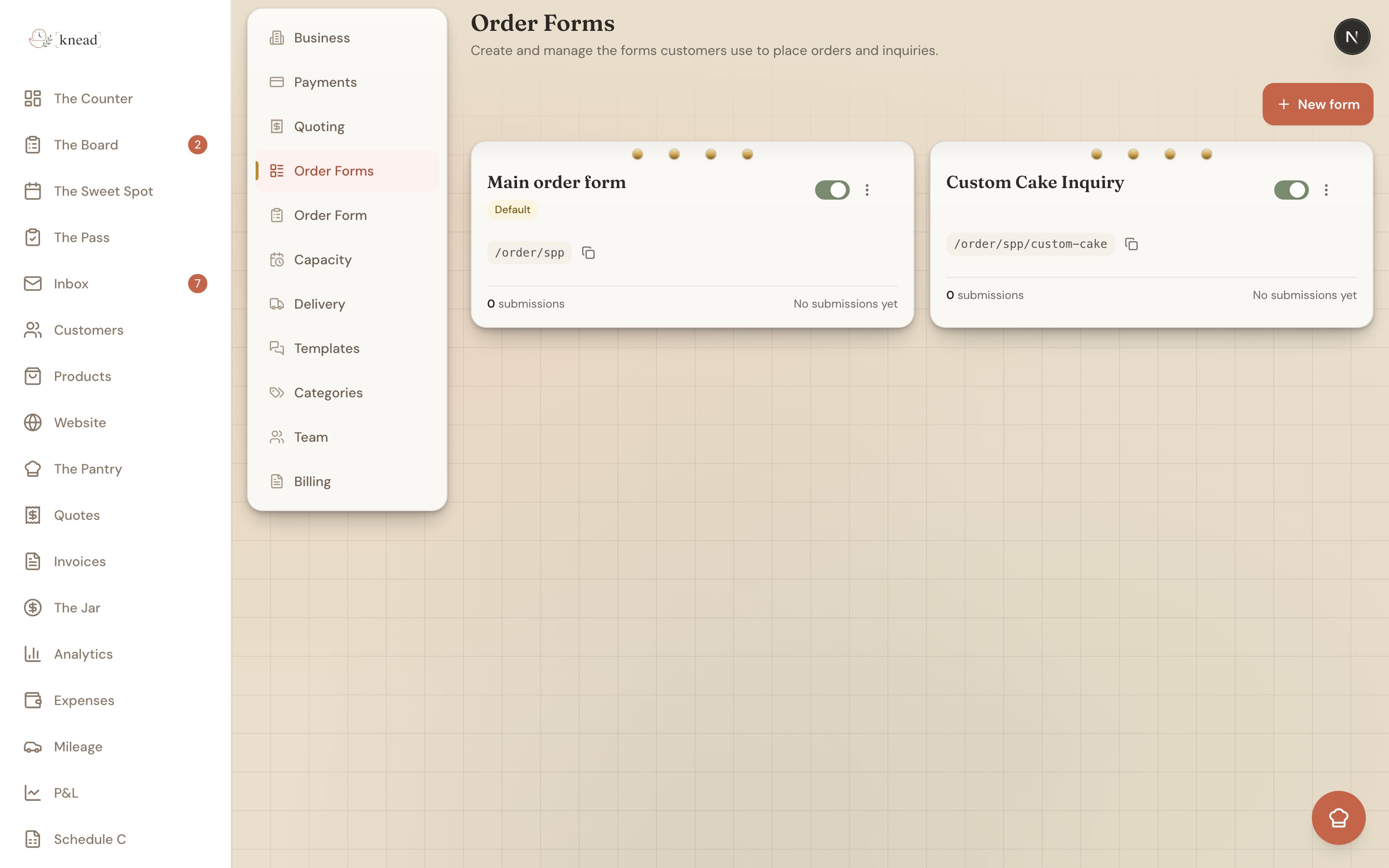
Tap **Settings**, then **Order Forms** (`/settings/order-forms`). Your forms appear as a **card grid** — one card per form.
Good to know: **Order Forms** (plural) is where you build and manage your forms. It's a different page from **Order Form** (singular), which handles your public form and availability settings.
## Reading a Form Card
Each card gives you the essentials at a glance:
* **Form name** — what you've called it.
* A **Default** or **Inactive** badge — the default form is the one that answers your main link; an inactive badge means the form is paused.
* The **public link** — `/order/{slug}` for the default form, or `/order/{slug}/{form-slug}` for the others.
* **Submission count** and the **last-submitted time**, so you can see which forms are pulling their weight.
* An **active / paused switch** to open or close the form to customers without leaving the page.
* A **menu** with the actions below.
### The Card Menu
Open a card's menu for these actions:
* **Open** — jump into the [builder](/managing-orders/building-a-custom-order-form) for that form.
* **Copy link** — grab the form's public URL to share.
* **Duplicate** — make a copy to use as a starting point for a new form.
* **Delete** — remove a form. You can't delete the **default** form, only extra ones.
## Creating a New Form
Tap **New form**. Knead creates the form and drops you straight into the builder so you can start adding fields. Give it a name on the **Settings** tab, build it out on the **Build** tab, and flip it live when you're ready.
Pro tip: Reach for **Duplicate** when a new form is close to an existing one. Copy your everyday menu, rename it "Holiday Pre-Orders," swap a few products, and you've saved yourself a rebuild.
## When to Run More Than One Form
A few ways bakers use multiple forms:
* **Seasonal menus** — a Valentine's or holiday form with just those items, live only during the window.
* **Wedding and custom inquiries** — a form that asks about guest count, event date, and design ideas instead of listing products.
* **Wholesale or corporate** — a form with different products, minimums, or pricing for business customers.
* **Events and markets** — a pre-order form for a specific pop-up or farmers market date.
Pause a form when its season ends and reopen it next year — the fields and settings are all still there.
## The Default Form and Its Link
One form is always your **default**. It answers your main order link, `kneadapp.co/order/{slug}`, and it can't be deleted. Every other form gets a link with an extra piece: `kneadapp.co/order/{slug}/{form-slug}`.
Good to know: Your default form — the **Main order form** — starts empty. While it's empty, your main link keeps showing the classic all-products order form. As soon as you add a field to it in the builder, it switches to your custom build.
## Related Articles
* [Building a Custom Order Form](/managing-orders/building-a-custom-order-form)
* [Sharing Your Order Link](/managing-orders/sharing-your-order-link)
* [How The Board Works](/managing-orders/how-the-board-works)
* [Customizing Your Public URL](/integrations-and-setup/customizing-your-public-url)
* [Reviewing and Accepting Enquiries](/managing-orders/reviewing-and-accepting-enquiries)
***
*Still need help? [Contact us](mailto:hello@kneadapp.co)*
## Where Your Forms Live
Tap **Settings**, then **Order Forms** (`/settings/order-forms`). Your forms appear as a **card grid** — one card per form.
Good to know: **Order Forms** (plural) is where you build and manage your forms. It's a different page from **Order Form** (singular), which handles your public form and availability settings.
## Reading a Form Card
Each card gives you the essentials at a glance:
* **Form name** — what you've called it.
* A **Default** or **Inactive** badge — the default form is the one that answers your main link; an inactive badge means the form is paused.
* The **public link** — `/order/{slug}` for the default form, or `/order/{slug}/{form-slug}` for the others.
* **Submission count** and the **last-submitted time**, so you can see which forms are pulling their weight.
* An **active / paused switch** to open or close the form to customers without leaving the page.
* A **menu** with the actions below.
### The Card Menu
Open a card's menu for these actions:
* **Open** — jump into the [builder](/managing-orders/building-a-custom-order-form) for that form.
* **Copy link** — grab the form's public URL to share.
* **Duplicate** — make a copy to use as a starting point for a new form.
* **Delete** — remove a form. You can't delete the **default** form, only extra ones.
## Creating a New Form
Tap **New form**. Knead creates the form and drops you straight into the builder so you can start adding fields. Give it a name on the **Settings** tab, build it out on the **Build** tab, and flip it live when you're ready.
Pro tip: Reach for **Duplicate** when a new form is close to an existing one. Copy your everyday menu, rename it "Holiday Pre-Orders," swap a few products, and you've saved yourself a rebuild.
## When to Run More Than One Form
A few ways bakers use multiple forms:
* **Seasonal menus** — a Valentine's or holiday form with just those items, live only during the window.
* **Wedding and custom inquiries** — a form that asks about guest count, event date, and design ideas instead of listing products.
* **Wholesale or corporate** — a form with different products, minimums, or pricing for business customers.
* **Events and markets** — a pre-order form for a specific pop-up or farmers market date.
Pause a form when its season ends and reopen it next year — the fields and settings are all still there.
## The Default Form and Its Link
One form is always your **default**. It answers your main order link, `kneadapp.co/order/{slug}`, and it can't be deleted. Every other form gets a link with an extra piece: `kneadapp.co/order/{slug}/{form-slug}`.
Good to know: Your default form — the **Main order form** — starts empty. While it's empty, your main link keeps showing the classic all-products order form. As soon as you add a field to it in the builder, it switches to your custom build.
## Related Articles
* [Building a Custom Order Form](/managing-orders/building-a-custom-order-form)
* [Sharing Your Order Link](/managing-orders/sharing-your-order-link)
* [How The Board Works](/managing-orders/how-the-board-works)
* [Customizing Your Public URL](/integrations-and-setup/customizing-your-public-url)
* [Reviewing and Accepting Enquiries](/managing-orders/reviewing-and-accepting-enquiries)
***
*Still need help? [Contact us](mailto:hello@kneadapp.co)*